How does it work?
RAK4630 Click is based on the RAK4630 module from RAKwireless, which integrates the Nordic nRF52840 MCU supporting Bluetooth 5.0 and the Semtech SX1262 LoRa transceiver. This board provides a dual-mode wireless communication solution featuring LoRaWAN and Bluetooth Low Energy (BLE) technologies for long-range, low-power IoT applications. The module is fully compliant with the LoRaWAN 1.0.3 specification and supports Classes A, B, and C, offering both LoRaWAN and LoRa Point-to-Point (P2P) communication modes for flexible deployment. Operating in the 868MHz frequency band (covering EU868, RU864, and IN865 regions), it delivers an output power of up to +22dBm for LoRa communication, ensuring extended range and reliable connectivity.
The BLE 5.0 interface provides transmit power from -20 to +4dBm in 4dB steps, allowing short-range wireless communication, configuration, or local control through compatible BLE devices. The RAK4630 module’s dual RF capability enables the simultaneous use of LoRa for long-range data transfer and BLE for local device management, making it an ideal choice for IoT gateways, smart building automation, remote sensor networks, and asset tracking systems. Additionally, the module runs on RUI3 (RAKwireless Unified Interface) firmware, which simplifies development by allowing users to create custom firmware directly using RUI APIs without needing an external MCU.
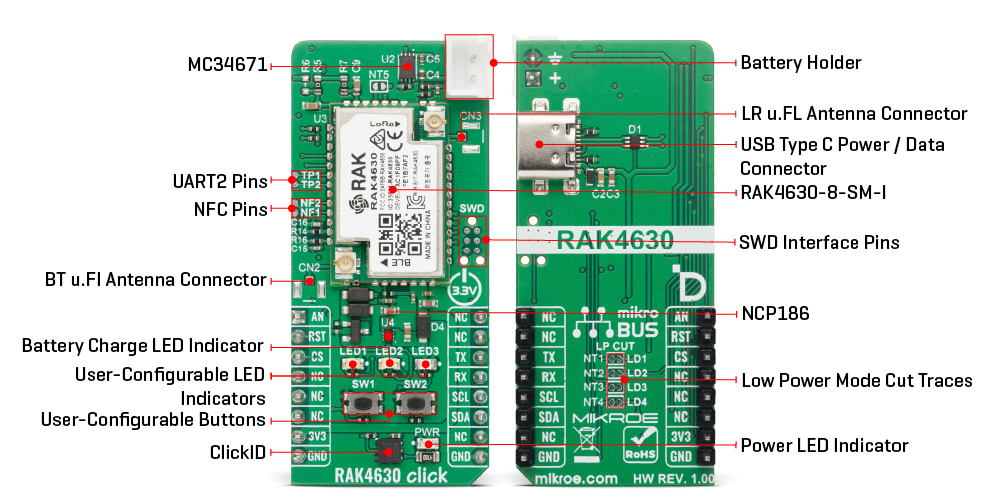
This Click board™ establishes communication between the RAK4630 module and the host MCU via AT commands through UART interface, using standard UART RX and TX pins. The default communication speed is set at 115200bps. Additionally, the board includes an I2C interface pins. Furthermore, RAK4630 Click features a USB interface that can be used both for communication and as a power supply, allowing the module to operate as a standalone device. For portable or remote applications, the board also supports power delivery from a Li-Ion or Li-Polymer battery, which can be conveniently charged through the onboard MC34671A battery charger IC. An orange LED labeled LED2 provides visual feedback during the charging process, indicating active battery charging status.
Along with the communication and control pins, this Click board™ also includes a reset pin (RST) enabling easy module resetting, AN pin connected to the analog input pin of the RAK4630 module, and SWD pads designed for use with MIKROE's 6-pin Needle Cable, providing an optional flash and debug SWD (Serial Wire Debug) interface functionality. Additionally, the board features two user-configurable buttons (SW1 and SW2) and two user-configurable LED indicators (a red LED1 and yellow LED2) for customizable user interaction and status indication.
The RAK4630 Click includes a set of easily accessible test points designed to support debugging, monitoring, and functional evaluation of the onboard module. Test points 1 and 2 are connected the UART2 interface pins, providing a convenient serial communication channel for data transmission, firmware debugging, or connection to an external host controller. Test points 3 and 4 are connected the NFC pins of the RAK4630 module for integrating advanced NFC functionalities into your applications.
Additionally, on the back side of the board, there is a designated LP CUT section consisting of cuttable traces that connect user-configurable LEDs. By cutting these traces, the LEDs and battery monitoring function (NT5) are disabled, resulting in reduced power consumption and improved energy efficiency, making the board particularly suitable for battery-powered or energy-sensitive applications.
In addition to the onboard IPEX connectors provided on the RAK4630 module for LoRa and Bluetooth antennas, the RAK4630 Click also includes two optional footprints for external antenna connectors. These additional connector pads allow the use of standard external antennas for both LoRa and Bluetooth communication when users prefer this option instead of the default IPEX connector type. The optional antenna connector positions are left unpopulated by default, giving developers the freedom to choose and solder the appropriate connector type according to their application requirements.
This Click board™ can be operated only with a 3.3V logic voltage level. The board must perform appropriate logic voltage level conversion before using MCUs with different logic levels. It also comes equipped with a library containing functions and example code that can be used as a reference for further development.
Specifications
| Type |
LoRa |
| Applications |
Ideal for IoT gateways, remote sensor networks, smart building automation, asset tracking, and energy-efficient wireless monitoring systems |
| On-board modules |
RAK4630 - WisBlock LoRaWAN + BLE module from RAKwireless |
| Key Features |
Dual-mode wireless communication, compliance with LoRaWAN 1.0.3 Classes A, B, and C, LoRa P2P communication capability, UART and I2C communication interfaces, support for easy-to-use AT command set, integrated USB interface for power and data communication, standalone operation capability, SWD pads for flash and debug functionality, and more |
| Interface |
I2C,UART,USB |
| Feature |
ClickID |
| Compatibility |
mikroBUS™ |
| Click board size |
L (57.15 x 25.4 mm) |
| Input Voltage |
3.3V |
Pinout diagram
This table shows how the pinout on RAK4630 Click corresponds to the pinout on the mikroBUS™ socket (the latter shown in the two middle columns).
| Notes |
Pin |
 |
Pin |
Notes |
|---|
| Analog Output |
AN |
1 |
AN |
PWM |
16 |
NC |
|
| Reset |
RST |
2 |
RST |
INT |
15 |
NC |
|
| ID COMM |
CS |
3 |
CS |
RX |
14 |
TX |
UART TX |
| |
NC |
4 |
SCK |
TX |
13 |
RX |
UART RX |
| |
NC |
5 |
MISO |
SCL |
12 |
SCL |
I2C Clock |
| |
NC |
6 |
MOSI |
SDA |
11 |
SDA |
I2C Data |
| Power Supply |
3.3V |
7 |
3.3V |
5V |
10 |
NC |
|
| Ground |
GND |
8 |
GND |
GND |
9 |
GND |
Ground |
Onboard settings and indicators
| Label |
Name |
Default |
Description |
|---|
| LD1/LD3 |
LD1 / LD3 |
- |
User-Configurable LED Indicator |
| LD2 |
LD2 |
- |
Battery Charge LED Indicator |
| LD4 |
PWR |
- |
Power LED Indicator |
| SW1-SW2 |
SW1-SW2 |
- |
User-Configurable Buttons |
| NT1-NT4 |
NT1-NT4 |
Connected |
Low Power Mode Cut Traces (LED Indicators) |
| NT5 |
NT5 |
Connected |
Low Power Mode Cut Trace (Battery Monitoring) |
RAK4630 Click electrical specifications
| Description |
Min |
Typ |
Max |
Unit |
|---|
| Supply Voltage |
- |
3.3 |
- |
V |
| LoRa Operating Frequency |
- |
868 |
- |
MHz |
| LoRa Output Power |
- |
+22 |
- |
dBm |
| BLE Operating Frequency |
- |
2.4 |
- |
GHz |
| BLE Transmit Power |
-20 |
- |
+4 |
dBm |
Software Support
RAK4630 Click demo application is developed using the NECTO Studio, ensuring compatibility with mikroSDK's open-source libraries and tools. Designed for plug-and-play implementation and testing, the demo is fully compatible with all development, starter, and mikromedia boards featuring a mikroBUS™ socket.
Example Description
This example demonstrates the use of RAK4630 Click board by showing the communication between two Click boards configured in P2P network mode.
Key Functions
rak4630_cfg_setup This function initializes Click configuration structure to initial values.rak4630_init This function initializes all necessary pins and peripherals used for this Click board.rak4630_cmd_run This function sends a specified command to the Click module.rak4630_cmd_set This function sets a value to a specified command of the Click module.rak4630_cmd_get This function is used to get the value of a given command from the Click module.
Application Init
Initializes the driver and logger.
Application Task
Application task is split in few stages:
- RAK4630_POWER_UP:
Powers up the device, performs a device factory reset and reads system information.
- RAK4630_CONFIG_EXAMPLE:
Configures device for the LoRa P2P network mode.
- RAK4630_EXAMPLE:
Performs a LoRa P2P example by exchanging messages with another RAK4630 Click board.
Application Output
This Click board can be interfaced and monitored in two ways:
- Application Output - Use the "Application Output" window in Debug mode for real-time data monitoring. Set it up properly by following this tutorial.
- UART Terminal - Monitor data via the UART Terminal using a USB to UART converter. For detailed instructions, check out this tutorial.
Additional Notes and Information
The complete application code and a ready-to-use project are available through the NECTO Studio Package Manager for direct installation in the NECTO Studio. The application code can also be found on the MIKROE GitHub account.