How does it work?
LIN Hall 2 Click is based on the TMAG5253, a low-power linear Hall-effect sensor from Texas Instruments. This device uses a ratiometric architecture to eliminate errors from VCC tolerance, as the external analog-to-digital converter (ADC) uses the same VCC for its reference. Additionally, the device features magnet temperature compensation for NdFeB and Ferrite to counteract the magnetic sensitivity drifts across a wide temperature range. It fully integrates the signal conditioning, temperature compensation circuits, mechanical stress cancellation, and output driver. The TMAG5253 is sensitive to the magnetic field component perpendicular to the sensor's top side. It also has a bipolar sensitivity where the north and south magnetic poles produce unique output voltages.
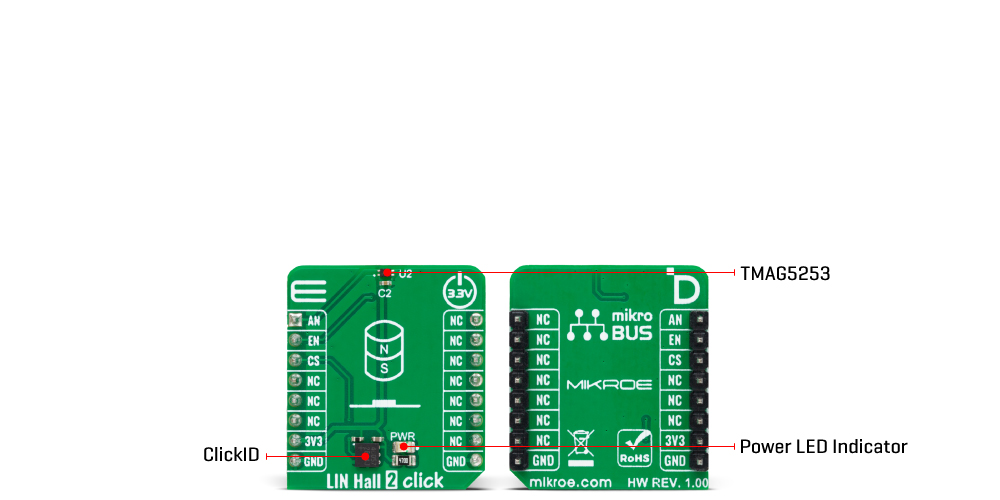
LIN Hall 2 Click uses an analog-to-digital converter (ADC) of the host MCU to read the analog values of the TMAG5253. The enable EN pin allows you to put the device in an ultra-low power (nA) mode when needed.
This Click board™ can be operated only with a 3.3V logic voltage level. The board must perform appropriate logic voltage level conversion before using MCUs with different logic levels. Also, it comes equipped with a library containing functions and an example code that can be used as a reference for further development.
Specifications
| Type |
Magnetic |
| Applications |
Can be used for the development of highly accurate rotary and linear position detection in automotive and industrial applications |
| On-board modules |
TMAG5253 - low-power linear Hall-effect sensor from Texas Instruments |
| Key Features |
Low power consumption, low-noise output, ratiometric analog output proportional to VCC, fast power-on time, wide magnetic sensitivity range, sensitivity compensation to support temperature drift for Neodymium magnet, and more |
| Interface |
Analog |
| Feature |
ClickID |
| Compatibility |
mikroBUS™ |
| Click board size |
S (28.6 x 25.4 mm) |
| Input Voltage |
3.3V |
Pinout diagram
This table shows how the pinout on LIN Hall 2 Click corresponds to the pinout on the mikroBUS™ socket (the latter shown in the two middle columns).
| Notes |
Pin |
 |
Pin |
Notes |
|---|
| Analog Output |
AN |
1 |
AN |
PWM |
16 |
NC |
|
| Chip Enable |
EN |
2 |
RST |
INT |
15 |
NC |
|
| ID COMM |
CS |
3 |
CS |
RX |
14 |
NC |
|
| |
NC |
4 |
SCK |
TX |
13 |
NC |
|
| |
NC |
5 |
MISO |
SCL |
12 |
NC |
|
| |
NC |
6 |
MOSI |
SDA |
11 |
NC |
|
| Power Supply |
3.3V |
7 |
3.3V |
5V |
10 |
NC |
|
| Ground |
GND |
8 |
GND |
GND |
9 |
GND |
Ground |
Onboard settings and indicators
| Label |
Name |
Default |
Description |
|---|
| LD1 |
PWR |
- |
Power LED Indicator |
LIN Hall 2 Click electrical specifications
| Description |
Min |
Typ |
Max |
Unit |
|---|
| Supply Voltage |
- |
3.3 |
- |
V |
| Magnetic Sensitivity Range |
-80 |
- |
+80 |
mT |
Software Support
LIN Hall 2 Click demo application is developed using the NECTO Studio, ensuring compatibility with mikroSDK's open-source libraries and tools. Designed for plug-and-play implementation and testing, the demo is fully compatible with all development, starter, and mikromedia boards featuring a mikroBUS™ socket.
Example Description
This is an example which demonstrates the use of LIN Hall 2 Click board by measuring magnetic field density and showing it in mT as well as detecting the orientation of the magnet.
Key Functions
linhall2_cfg_setup Config Object Initialization function.linhall2_init Initialization function.linhall2_read_an_pin_voltage LIN Hall 2 read AN pin voltage level function.linhal2_set_en_pin LIN Hall 2 set EN pin state function.linhal2_get_flux_density LIN Hall 2 read flux density function.
Application Init
The initialization of ADC module and log UART.
Application Task
The demo application reads the Magnetic field density and showing it in mT as well as the orientation of the magnet.
Application Output
This Click board can be interfaced and monitored in two ways:
- Application Output - Use the "Application Output" window in Debug mode for real-time data monitoring. Set it up properly by following this tutorial.
- UART Terminal - Monitor data via the UART Terminal using a USB to UART converter. For detailed instructions, check out this tutorial.
Additional Notes and Information
The complete application code and a ready-to-use project are available through the NECTO Studio Package Manager for direct installation in the NECTO Studio. The application code can also be found on the MIKROE GitHub account.